Social commentary can usually be hidden inside either science fiction or black comedy. The Dispossessed (Le Guin) is the former. I finished reading this book a few days ago, and I’ve quickly gotten hooked to Le Guin’s work. I have just started reading her other popular book The Left Hand of Darkness. Here’s a quote from Dispossessed that stuck with me:
They [People on Urras] all looked, to him [a Physicist from Annares], anxious. He has often seen that anxiety before in the faces of the Urrasti, and wondered about it. Was it because, no matter how much money they had, they always had to worry about making more, lest they die poor? Was it guilt, because no matter how little money they had, there was always somebody who has less? Whatever the case, it gave all the faces a certain sameness; and he felt very much alone amongst them.
– p.207, Kindle Edition
We can now say: we live in a world, sorry, an “emerging reality”, where we can have [waves hand] anything at any time to a basic level of competence, and all of the real problems, the “people problems” still exist. And this is finally proof positive, hard evidence, that artefacts are not really what we’re here for. We are demonstrably optimising about a mile from the bottleneck. AI may be giving you a million prototypes, but if you listen, AI is telling you in quite a painful way that being able to get feedback on your artefacts is much, much more important than the artefacts themselves.
And now it’s easier than it’s ever been to make that argument. Good!
…
It also seems obvious that a load-bearing part of those systems right now that we haven’t ever questioned is the now “old-fashioned” form of direct practice which brings junior developers into contact with the work, with the tools, and with the domain. …
It won’t necessarily directly result in worse code, but I think it’s reasonable to be wary of the direction of travel for the work. I’m worried that in thinning down the direct practice, we are interfering with important feedback loops between people and the domain, people and their teams, their peers, and their orgs.
– Team dynamics after AI | Mechanical Survival (Retrieved: [2026-07-17 Fri 16:00])
File transfer within the Apple ecosystem is very good: AirDrop works flawlessly most of the time. You can drop files to anyone using an iPhone, all you need is physical proximity. I have used it with strangers in the park and at home when sending pictures to family. Picture quality is retained, metadata is also retained (mainly the time at which a picture was captured and location information, if included) The closest equivalent that I know of in the open source world is KDE Connect. KDE Connect is noticeably unreliable. It recently stopped working for iPhones when sending data to Linux, although it still works when sending data to Android. These are minor kinks, probably caused by version differences between the KDE Connect app on the iPhone and the GSConnect extension on Gnome, likely introduced when a product is not as rigorously tested across versions as AirDrop. While looking through the list of Flatpak apps available on the Debian Software store, I came across Magic Wormhole, a protocol that uses a relay server in the middle to allow two peers to discover each other using a single short string, and send files directly to each other. I have not tested this in the real world under various network restrictions, which might make P2P file transfer impossible. I am looking forward to trying it out over the next few days.
Huion Inspiroy H610X - review on GNU/Linux - YouTube
I have always wanted a Wacom on my desk. I don’t have any real use for it because I don’t sketch very well, and all my drawing is done in Excalidraw which is great to use with a keyboard and a mouse. Despite this, when I see someone like the creator of this video at work creating a web comic, I feel a longing for a drawing tablet. And the skill to be able to draw well. Artists who are great at their craft make creative work look easy!
Media Transfer Protocol (MTP) is the usual method for copying multiple files over from an Android
device to a Linux computer. The underlying ext filesystem on an Android device is exposed through
MTP. MTPFS implemented in Golang works well to turn this into a standard file system:
hanwen/go-mtpfs: Mount MTP devices over FUSE.
FUSE is an interface that allows unprivileged users to create a virtual file system and export it to the Linux kernel, making it indistinguishable from other filesystems. This is great for a quick back-up of all the files on an Android device in the “Internal storage” section.
Install libusb-dev which contains the libmtp header files:
$ sudo apt install libusb-1.0-0-dev
Clone MTP FS implementation in Golang:
$ git clone git@github.com:hanwen/go-mtpfs.git
Build the Golang application.
Create a mountpoint for the MTP device:
$ sudo mkdir /mnt-mtp
$ sudo chown 1000:1000 /mnt-mtp
Connect an Android device and set the connection mode to File transfer / Android Auto
Start the MTP filesystem:
./go-mtpfs /mnt-mtp
Confirm that the MTP filesystem was mounted properly: (I am checking whether files transferred from a Sony Camera using the Imaging Edge Mobile application show up properly.)
$ ls -1 /mnt-mtp/Internal\ shared\ storage/DCIM/Imaging\ Edge\ Mobile/  | head -1
D8C02177.JPG
The FUSE filesystem can be unmounted as usual using:
$ umount /mnt-mtp
MTP is quiet slow the first time that it enumerates files in a directory. For a directory containing 1400 files, it took ~15 seconds to list the whole directory on a 3 year old Android device. Interestingly, this list seems to be cached because the second list completed instantly.
# ~ [0s]
$ ls -1 /mnt-mtp/Internal\ shared\ storage/DCIM/Camera | head -3
thumbnails
IMG_63.jpg
IMG_52.jpg
IMG_22.jpg

# ~ [14s]
$ ls -1 /mnt-mtp/Internal\ shared\ storage/DCIM/Camera | wc -l
1467

# ~ [0s]
Edit: For reference, I used rsync on the FUSE MTP file system to transfer a large set of files
to an SSD. This is how long it took: (This is fully limited by the phone’s flash storage and the MTP
software overhead, because the SSD transfer times for the destination are certainly higher than 5
Mbps.)
sent 17.43G bytes  received 28.51K bytes  5.16M bytes/sec
total size is 17.46G  speedup is 1.00

# ~ [56m 20s]
The renaming of human genes to please Excel is sad, but hilarious, and a daily occurrence for people using software. Software like Excel makes it easier to work with lots of structured data. But in this particular case, it has had an impact on the data itself: Forcing data to bend to the will of software.
Help has arrived, though, in the form of the scientific body in charge of standardizing the names of genes, the HUGO Gene Nomenclature Committee, or HGNC. This week, the HGNC published new guidelines for gene naming, including for “symbols that affect data handling and retrieval.” From now on, they say, human genes and the proteins they expressed will be named with one eye on Excel’s auto-formatting. That means the symbol MARCH1 has now become MARCHF1, while SEPT1 has become SEPTIN1, and so on. A record of old symbols and names will be stored by HGNC to avoid confusion in the future. … But Bruford says this is the first time that the guidelines have been rewritten specifically to counter the problems caused by software. So far, the reactions seem to be extremely positive — some would even say joyous.
– Scientists rename human genes to stop Microsoft Excel from misreading them as dates | The Verge (Retrieved: [2026-06-10 Wed 12:24])
I have had to use websites of many different airline companies. All their websites are universally bad. They always ask for the same five things: Departure date, return date, round trip or one-way ticket, origin, and destination airports. Despite this seemingly simple input list, their websites are often extremely clunky. There are a lot of moving elements, sliding presentation type top bars, a LOT of JavaScript. 99% of people who travel Economy probably book the cheapest ticket for their dates, origin, and destination. I don’t care much about the airline’s loyalty program1 or what their new “first class” cabin looks like (I am not going to book it anyway.)
There is also some issue with registration, login, and payments every time.
I have had to deal with uncaptured credit card payments multiple times. i.e. the payment was authorized by my credit card’s company, but it was not “captured” by the receiver, thus causing the ticket to remain in “awaiting payment” limbo, until the travel day. When I show up at the check-in counter, airline staff tell me “there is a problem with your ticket” when the problem was really with their backend’s inability to process background jobs accurately.
Loyalty programs have no benefit for people paying for their own tickets. If you are not traveling on more than 20 long-haul flights a year, forget loyalty programs and just book the cheapest ticket. ↩︎
Re: Big Ball of Mud
This was written nearly 30 years ago! But all of the conclusions drawn in it are still valid! Software that exists around us continues to be a “Big Ball of Mud”. There might be some systems which are truly remarkable because of their simple design. They’ve resisted becoming a Big Ball of Mud over a long period of time. These systems are the exception that prove the rule.
Navigating these large systems of mostly unorganised code, using incomplete, outdated documentation, and (from 2026) AI tools, while simultaneously attempting to implement improvements and reduce maintenance burden, is the day-to-day work of software engineering.
As companies grow, complexity increases. However, revenue is always top of mind. High minded considerations of “architectural purity” seldom make the long journey from idea to reality.
A couple of quotes that resonated:
Indeed, an immature architecture can be an advantage in a growing system because data and functionality can migrate to their natural places in the system unencumbered by artificial architectural constraints. Premature architecture can be more dangerous than none at all, as unproved architectural hypotheses turn into straightjackets that discourage evolution and experimentation.
The software is ugly because the problem is ugly. Or at least, not well understood. Frequently, the organization of the system reflects the sprawl and history of the organization that built it.
The complete addition of Memos to the Ansible playbook for my general purpose VM took about 30 minutes (without any AI assistance, because I am still not using AI on my personal machine.). This is great! With a more complex orchestration platform such as Kubernetes, getting the application running is easy enough: A Deployment manifest to run Memos would be very easy. However, getting it to be stateful will be hard. (On a VM, I am happy to let Memos use its built-in Sqlite backend. On Kubernetes, this would be reckless because pods are ephemeral and shouldn’t be used to store data.)
I started testing out the Nix package manager to simplify the installation of packages on a new Linux machine. I am using Ansible today, and it works for the most part. But it requires a lot of maintenance and I am rarely able to use it to bootstrap a new Linux machine without any updates. The Nix approach is very attractive because each package installed using Nix brings all of its dependencies including shared libraries. Packages are built using build recipes; and these are publicly available. Builds are also cached, so not everything has to be built locally.
If every package can bring it’s shared libraries, then that simplifies running most programs (with a few caveats). This situation made itself very apparent recently when Spotify’s builds upgraded Libc to a version that existed only on the latest versions of Debian and Ubuntu.1 This single shared library version upgrade broke the Spotify Linux client. Nix did solve this problem on Ubuntu 22.04 LTS for me!
I have installed Rust based tools such as bat using Nix. I have also installed the latest version
of qpwgraph using it. Spotify’s client finally started working again after being installed through
Nix. (The Spotify build recipe is well worth a read! It ingeniously gets around Spotify’s
restriction on distributing binaries on their behalf.)
Alacrity didn’t work because it doesn’t work on non-Nix OS systems by default: https://github.com/nix-community/home-manager/issues/4720 There is a way to get it working using a home manager wrapper. One step at a time!
Spotify’s Linux client is not officially supported and apparently maintained by a few engineers at Spotify who want a Linux client themselves (?) I read this somewhere in Spotify’s support documentation. Even though this particular build did not work, thanks for the great work to whoever is maintaining the Spotify Linux client! ↩︎
There was a period in my previous job when I was enamored with Perl. It is a great scripting language. I was deep enough in the Perl-hole that I wrote an important personal finance script in Perl: A script to convert a GnuCash book into a Ledger file. Ledger is great for analysis, but not the best tool for data entry.
With AI-assisted coding coming on the scene, I did a quick rewrite from Perl to Golang using OpenCode, backed by Claude Code’s Sonnet model. I was planning to do this by hand, it may have taken me months to get to it eventually. The world changes, and one must change with it! Rewriting open source projects which are probably already in the training dataset of the foundational models anyway is a total win-win.
I have not merged the rewrite yet because I am still running it locally, verifying the output, and updating the README.
Update: I have merged this MR after a few more minor tweaks and some testing sessions.
There has been a sudden influx of intriguing tools: NanoClaw is one of them. I have not used it yet. The usage of WhatsApp as a communication channel is a great idea. The usage of skills to explain “how” to add WhatsApp (or other tools) as a communication channel is very AI-native and completely bypasses the need to write code for the integration. I want to test this tool out, I don’t know how to do it securely yet though, so I’m holding off for the time being.
Re: I Hated Every Coding Agent, So I Built My Own — Mario Zechner (Pi) - YouTube
I have customized Emacs and VS Code to suit the way that I like to use computers. Zechner’s talk argues for a world where there is a basic coding agent (Pi) and extensions that are built on top of this agent. Users choose how to compose the agent together with extensions, depending on the way that they like to work. The coding agent does not make the decisions that should be left to users. In my use of Claude Code and OpenCode at work1, I have noticed that Claude Code has a tendency to “commit” each small change immediately after making it. This keeps commits small, but makes it hard for me to distinguish between AI-written code and code that was already reviewed and committed by me. I don’t like this. I would like to take the “commit” step out of the agent loop (if it is actually defined in there). OpenCode does not do this: It makes changes to files on disk, and leaves everything else to me: This is the way that I like to work.
Both approaches are valid; both will have its userbase; users should be able to customize a single stable coding harness to their needs. They should not have to “switch” to a new harness to avoid features they don’t like or to get features they want to use.
As Zechner says in this talk, no one knows what the ultimate form of a coding agent will look like. My bet is that it will look similar to OpenCode. The TUI separates the agent’s work which happens in the terminal, from the reviewer’s work which happens in an IDE. This separation also creates a distinct step between “write” and “review”, reducing the context switching required. It is an exciting time for tooling enthusiasts!
These are the only two AI-assisted coding harnesses that I have used. ↩︎
Re: When “technically true” becomes “actually misleading”
This was an interesting new way to look at the people who are perpetually skeptical about AI. For many months now, I was a skeptic. Now, I know that my skepticism was mainly due to the tools that I had access to, and they were simply not good enough. My tools and my use-case did not give me an experience worth talking about. Curiosity persists though. Eventually, I realized that OpenCode is great! It has measurably increased my productivity.
I was able to open three pull requests on Friday. I was finally able to solve problems which had remained unsolved for multiple months because most team members were doing something else and this never came to the top of the “pick up” pile. Before you say anything: The pull requests that I make using OpenCode were not built on full auto-pilot by any means! This is my rough workflow now:
So, the cycle takes about 2 hours per pull request, and that’s the formula behind my 3 PRs a day on that day; a particularly productive day.
Solaar is a Linux GUI manager for Logitech mice and the small USB receiver which is used to connect the mouse to a computer. This receiver used to be device 1 on my Logitech MX Master mouse. At some point though, I forgot that device 1 was reserved and paired a laptop via Bluetooth. Logitech has their own software to fix this and repair the receiver with the mouse, but this (predictably) runs only on Windows and Linux. Solaar fixes this: The GUI is intuitive and I was able to repair the mouse and my receiver in about 5 minutes. Great! (No more 30 second delay after the PC starts up until the mouse starts working => This is not consistent, but sometimes, Bluetooth connection simply does not work and I have to forget and repair the mouse.)
Caffeine is a GNOME Shell extension which can be used to temporarily disable the screen lock and idle setting on a Linux machine using GNOME as the desktop environment. The screen lock can be disabled by directly going into the Settings utility as well, but Caffeine makes this super simple by adding a Coffee cup icon to the right side of the sticky top bar in Gnome. Click this icon, and auto-lock is temporarily disabled. Click it again and it is re-enabled. Open a video in full-screen and auto-lock is automatically disabled and re-enabled when you leave full screen. A very useful tool!
I found out about Bubblewrap recently. It allows the user to run a program in a sandbox, and restrict its access to paths and resources on the host.
For instance, we can run a Bash shell which has no network interface:
$ bwrap --unshare-all --new-session --ro-bind / / /bin/bash
$ ip link
1: lo: <LOOPBACK,UP,LOWER_UP> mtu 65536 qdisc noqueue state UNKNOWN mode DEFAULT group default qlen 1000
    link/loopback 00:00:00:00:00:00 brd 00:00:00:00:00:00
$ curl icanhazip.com
curl: (6) Could not resolve host: icanhazip.com
Or, maybe you want to run a command which does not have access to your personal files inside
/home:
$ bwrap --ro-bind /usr /usr \
      --symlink usr/lib64 /lib64 \
      --symlink usr/bin /bin \
      --symlink usr/sbin /sbin \
      --chdir / \
      --unshare-all \
/bin/bash
bash-5.2$ ls /home
ls: cannot access '/home': No such file or directory
Note: The reason that we mount the various directories in /usr and under it separately, but
don’t mount / directly, is to ensure that we can mount something else at /home! In fact, it is
possible to use bwrap to start as a new user with its own home directory that is inside the
~/sandbox of the host’s filesystem. I was wondering why all the online examples used this!
So far, I have had one use-case for such sandboxing: I use a Perl script to convert GnuCash files into Ledger data files, because I use Ledger for analyzing my personal finances. I want this script to never edit the input GnuCash file. I know that the program does not do it; however, having an additional guarantee is not a bad idea, so I use Docker to run the script and use a read-only volume mount to ensure that the input file can not be edited. This has not been easy to use though. So, I will probably shift it to use Bubblewrap soon.
I use Ansible to maintain a Miniflux instance which is running inside a private Wireguard
network. The website has TLS (even though it is running inside Wireguard; I know this is pointless)
and certificates are issued automatically using CertBot through LetsEncrypt. These certificates are
also supposed to be renewed automatically. Since the beginning of this setup (roughly 2 years ago),
this has not been working properly, because once the certificate is renewed the Nginx process needs
to be reloaded (systemctl reload nginx) in order to serve the new TLS certificates to the
user. CertBot supports running arbitrary commands after a certificate renewal through pre, post
and deploy hooks. I set up a deploy hook but that was not working because the script was not
executable. (I created the script with the permission bits set to 0600 reflexively!)
The fix was simple: Update the Ansible role to set the mode on the containing directory
/etc/letsencrypt/renewal-hooks/deploy to 0755 and the permission bits on the script
/etc/letsencrypt/renewal-hooks/deploy/01-restart-nginx to 0744. The script used /bin/bash
which was failing (or at least throwing a warning) because the locale was not set appropriately in
the environment where the script was running. So, I updated it to use /bin/sh instead:
#!/bin/sh

systemctl reload nginx
Whether this hook will run during a certificate renewal can be tested by running sudo certbot renew --dry-run and following the /var/log/letsencrypt/letsencrypt.log file. The log file contains this
line, which indicates that the deploy hook would have run if the dry-run flag had not been supplied:
2026-02-21 11:52:46,997:INFO:certbot._internal.hooks:Dry run: skipping deploy hook command: /etc/letsencrypt/renewal-hooks/deploy/01-restart-nginx
Over the past year, I have successfully combined all my TODO lists into a single Org-roam notebook,
which is just a bunch of .org files, stored inside a single directory. Simple: I can back them up
by running rsync. I can version them using Git. I can move them around safely using Tomb. I can
navigate to any of them or add a new note using the org-roam.el Emacs package. I can use usual
plaintext search tools such as ripgrep to find words or phrases in files. I really like this
setup, and use it at work as well. Org-agenda is Org-mode’s native capability of showing a daily or
weekly TODO list called an Agenda: It contains the tasks that are scheduled for today or have their
deadline in a few days. The time that it takes to build the agenda using native Org-mode is too
long: For my notebook with about 80-90 files with TODO items, it takes 150 seconds! This makes the
whole setup unusable. Emacs is single-threaded and is not able to opening 100s of files and look
through them in a performant manner. Two packages, org-super-agenda and org-ql, helped me solve
this issue, and reduced the time taken to open the daily agenda to under 10 seconds.
org-ql provides a flexible query language to fetch the tasks which will be displayed in the
agenda. And it provides a helpful wrapper that allows the user to dynamically define the list of
files to search during runtime. Org-mode’s native agenda accepts a list of files and directories to
search for TODO items. It will look through all files. Even the files that don’t have any TODO
item in them. Excruciatingly slow! One quick optimization is to use ripgrep to condense this full
list of files into just the ones that contain a TODO item.
org-super-agenda focuses on grouping the tasks that are to be displayed as part of the agenda. For
instance, I have four groups:
WAITING state
org-super-agenda groups tasks that are gathered by org-ql. This is great: I can use both
independently as well, and I used only org-super-agenda for some time at work. But adding org-ql
was a logical next step.
The changes for this in my Emacs configuration are in these two commits:
It would be great if someone would wrap all this up by creating a new package. I am sure this would be useful for other people who are on slow laptops but have a lot of files in their org-roam notebook, only a small subset of which have TODO items.
Charging through the USB-C port has had a tangible impact on the amount of chargers I carry when going outside. The last time that I traveled, I took a single charger with me, even though I had three devices. (All of them supported the USB-C Power Delivery (PD) protocol. The charger was also a USB-C Power Delivery - Standard Power Range capable device.) The devices were able to negotiate whatever power they wanted with the charger. This is a great improvement to having multiple cables for multiple devices. This is not the full picture though and has probably lead to more confusion for many people.
Not all devices that have a physical USB-C port support the USB-C PD protocol. I am repeating what many articles online have already explained. I ran into this firsthand a few days ago, when I attempted to charge a device that was completely discharged. I tried charging it with multiple power sources: a wall socket adapter, a laptop’s USB-C port, a laptop charger with a maximum voltage of 100W. In all these cases, despite being plugged in for many hours, the device did not show any sign of being alive. I guessed that the battery was dead and I would have to dispose the device.
A day before throwing it out though, something bugged me about the USB-C port on the device, and I decided to try to charge it with a non-USB-C PD enabled charger: a simple wall socket USB-A adapter and a USB-A to USB-C cable. Voila! The device turned back on after about 15 minutes!
The chargers I used do not seem to have supplied the minimum power that that was required to turn the device back on, or perhaps as this device does not have USB-C PD support, they probably just gave up and did not supply any power at all. This is not how the specification is worded, with this technical note saying that chargers must deliver the pre-Power Delivery protocol power on the USB-C connection upon initial connection. The gulf between USB specifications and their implementation has once again come back to bite us.
Often, when I am about to charge an electronic device that I bought in one country in a different
country, I look at the label which lists the voltage and frequency for which the adapter is
designed. Most adapters are usually marked 100-240V, 50/60Hz, which covers everywhere around the
world. So, the only thing that is required is a physical plug converter. But sometimes, you might
run into devices that are marked 220-240V, 50 Hz (AC supply in India) or 100-110V, 50/60Hz (AC
supply in Japan) With such single voltage only devices, one must use a step-up or step-down
transformer when using the appliance in a country with a different supply voltage. (There is no
converter for frequency itself and appliances with motors will probably suffer when the frequency
changes.)
One of the questions I started thinking about recently was whether one might be able to put some Solar panels outside, connect it to a battery, and run a small generation system at home which would supply power directly at 110 V (or 220 V if you are in the opposite situation). Is that a viable option? Solar panels are becoming more and more prevalent in both India and Japan and I am seeing a lot of individual houses that are making the capital investment, which is supposed to be recovered in 18-36 months.
Every year around this time, I have to file a tax return which (more or less) specifies all my income, all my deductions, and the tax that was deducted at source already. The process that I use for this is to convert my GnuCash accounts book into a Ledger file, and then use Ledger for verifying the various amounts. I like GnuCash because it has an intuitive user interface, that I have gotten quite comfortable with over the years. I like Ledger because it is a command line tool that I can use to create “repeatable” commands.
For instance, this command in Ledger gives me a total for the Income tax that has already been deducted from all my income this year:
$ hledger --file book.dat bal --begin 2025-01-01 --end 2026-01-01 'Taxes:Income tax'
The output of this command did not match initially. I was not exactly sure why. My guess was that
the difference was due to a single transaction. So, I calculated the difference (Say: 2178) and
then, I used ripgrep to search the text file:
$ rg -C5 2178 book.dat
This pointed me towards a single transaction that matched this amount. If there were multiple
results, or no results, I could ask hledger to output the Income tax deduction on a monthly basis,
and eyeball the result for anomalies.
Now, the conversion to Ledger for analysis is not necessarily a requirement. In fact, GnuCash has
the Reports feature which can be used quite effectively for this purpose. Beware though, because
the Report configuration is not stored as part of a GnuCash file, or anywhere that I know of which
can be stored in a backup somewhere. So, every time that I update my computer or re-install the
operating system, I lose all my existing reports configuration, which is a shame.
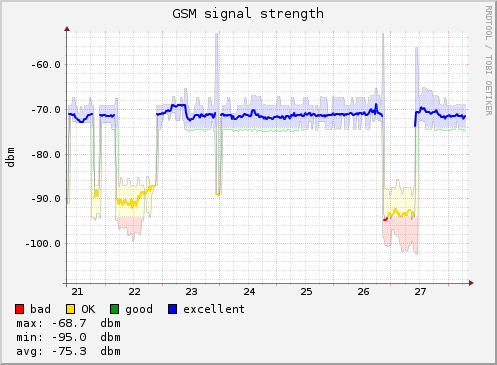
I have been interested in using RRDtool to monitor some numeric data for a while now. The main reason is because the graphs which are created by RRDTool look quite good: They are simple, but convey useful information succinctly. I have seen them around in a few places. They look like this:
source: GSM Signal Strength
Today, I spent about 40 minutes downloading the NIFTY 50 historical data for the year 2025,
transforming it into a format that can be used to executed rrdtool update commands, and eventually
come up with a Nifty 50 12 month graph, with 12 monthly averages. That may be useful, if I want to
calculate the value of my portfolio over time. (This is also something that GnuCash sort-of does
already, though I don’t understand “Value-over-time” graphs.)
These kind of graphs would be useful for timings of various requests that are being performed on the network, or for other kinds of data (like packet counters). I was looking at USB temperature sensors, which might be an interesting project. I don’t know if will work well with Linux though. This kind of data would also just be interesting to look at over a long period of time. For instance, the number of packets sent/received by a router over a period of 10 years would be cool to see.
I saw a YouTube video where the sensor was plugged into an Android device, a Notes app was opened, and once a button was pressed on the sensor, it started acting like a keyboard and sending data to the Android device as text (pretending to be a USB keyboard, I presume).
This note was created by calling a single function using the keybinding C-c n n! It is
surprisingly hard. Despite all the flexibility that is built into Org capture, the one thing that it
cannot do is to take a string from the user, and use that string both in the captured file’s
name and within the captured file’s content.
So, I had to write a bit of Elisp to get around this pesky limitation, that I have run into in other places as well:
(defun kannan/capture-new-note ()
  (interactive)
  (let* ((note-title (read-string "Note title: "))
         (note-file (expand-file-name (format "%s.org" (string-to-slug-with-date note-title)) local/notebook-location))
         (note-template '"#+title: %s
#+date: %%U
")
         (note-content (format note-template note-title)))
    (with-temp-buffer
      (insert (org-capture-fill-template note-content))
      (write-file note-file))
    (find-file note-file)
    (end-of-buffer)))
This function reads a note title from user input, converts it into a file name by replacing spaces with hyphens and converting everything to lower-case, writes the content of the capture template into a temporary buffer and saves it to said file, and then opens the created file and moves to the end of that new buffer.
The only part that org-capture is not able to do is select a dynamic filename. The solution
suggested by ox-hugo is to use a single file and put multiple posts inside that file. I don’t like
this solution much, because it ties me down to using Emacs exclusively to work with the list of
posts.
For instance, I am thinking of creating a pre-commit hook that will fail when a .org file in
content-org/ does not have a corresponding .md file in content/note/. This would have to be
implemented within Emacs if I used a single file.
(Converting Org to Markdown in CI or in a pre-commit hook would be much better. But I would have to invoke Emacs from a pre-commit hook which would increase commit time significantly. I don’t much like pre-commit hooks anyway.)
This note checks whether note ordering works properly when I use the huge new content CLI command.
Let’s begin!
$ mkdir -p notebook
$ hugo new site notebook
All this was dry land
Yes, you have just always had your band
But you get sad enough because it’s all you seek